
Cart Page & Cart Drawer
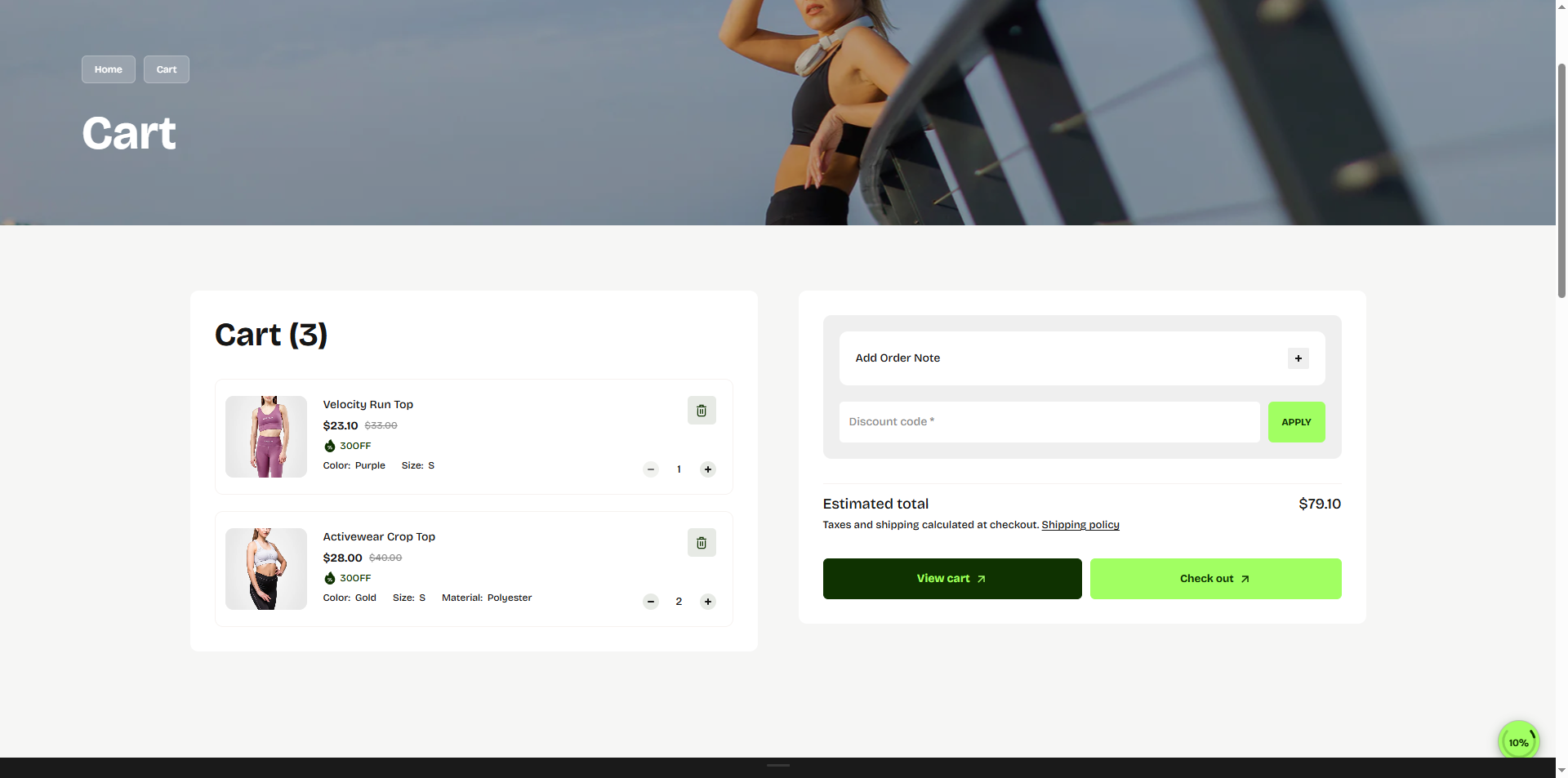
The Cart Page & Cart Drawer in the Kinetic theme is designed to deliver a smooth
and distraction-free shopping experience while keeping customers focused on completing their
purchase.
Customers can easily review selected products, update quantities, remove items, apply discount
codes, and proceed to checkout with minimal effort.
The cart layout presents important order details in a clean and structured format, including
product information, pricing, estimated totals, and optional order notes. Whether using the full
cart page or the quick cart drawer experience, Kinetic ensures a seamless journey from product
selection to checkout across all devices.
Key Features
- Product Details: Displays product image, name, selected variants, and pricing for each item.
- Quantity Control: Customers can easily increase or decrease product quantities directly from the cart.
- Remove Items: Allows users to remove products from the cart with a single click.
- Discount Code: Customers can apply coupon codes to receive discounts on their order.
- Order Note: Provides an option for customers to add special instructions or notes for their order.
- Subtotal Summary: Displays the total cost of items in the cart, including applied discounts.
- Checkout Button: A prominent call-to-action button that directs users to the checkout page.
- Continue Shopping: Allows customers to return to browsing products without losing their cart items.
How to Set Up the Cart
The Cart in the Kinetic theme allows customers to review the products they have added before proceeding to checkout. You can configure the cart to appear as a drawer or a full cart page and enable additional features to improve the shopping experience.
To configure your cart settings:
- From your Shopify admin , go to Online Store → Themes and click Customize on the Kinetic theme.
- In the Theme Editor sidebar, navigate to Cart page and cart drawer settings under Theme Settings (gear icon).
-
Cart Type:
Choose how the cart is displayed:
- Page: Redirects customers to a dedicated cart page.
- Drawer: Opens a side cart drawer without leaving the current page.
- Cart Page Settings
- Select Color Scheme: Choose the color scheme used for the cart section background, text, and buttons.
- Section Border Radius: Adjust the corner roundness of the cart container and cart elements.
- Show Tax Information: Enable this option to display tax and shipping information below the subtotal section.
- Show Cart Note: Allows customers to add special instructions or order notes directly from the cart page.
- Show Discount: Enable customers to apply discount or coupon codes inside the cart.
- Top Spacing: Controls the spacing above the cart section on desktop devices.
- Bottom Spacing: Controls the spacing below the cart section on desktop devices.
- Mobile Top Spacing: Adjusts the top spacing of the cart section on mobile devices.
- Mobile Bottom Spacing: Adjusts the bottom spacing of the cart section on mobile devices.