Colors
One of the most important components of designing a visually appealing, functional, and accessible theme is color.
Not only does a well-designed color system reinforce a merchant’s branding, but it also has the power to enhance and improve user experiences.
Configure your brand colors in the color settings. These color elements are used in all the general sections, header, and footer.
Customize Your Colors to Match Your Brand
Personalizing your theme’s colors is a breeze with Adorn! Tailor your site to reflect your brand identity effortlessly.
To change the colors:
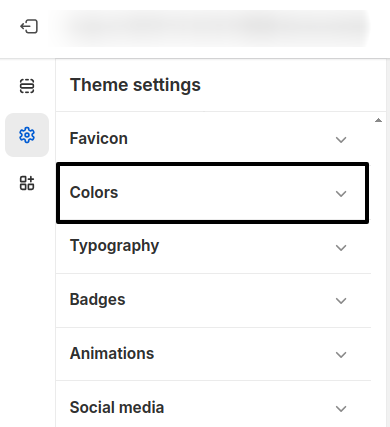
- Open the Customizer.
- Click on the "General Settings" icon.
- Select the "Colors" option.
Set the Colors
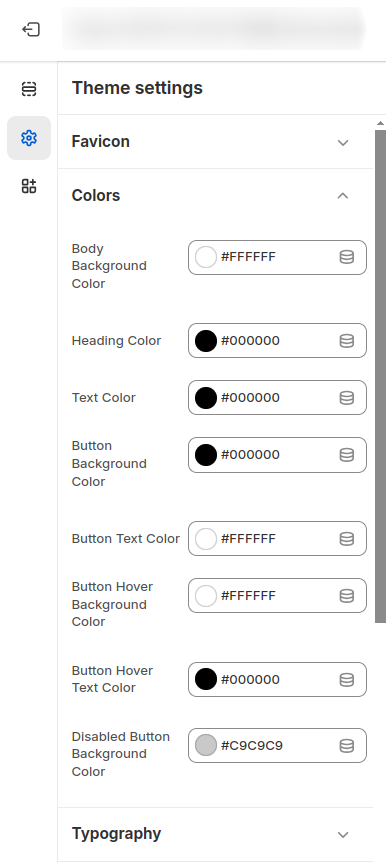
The Colors settings in your Shopify Adorn theme control the global color scheme for your entire store
1. Body Background Color
- Set the background color for your store's overall background to ensure consistency.
2. Heading Color
- Choose a heading color that makes headings stand out and remain legible.
3. Text Color
- Define a uniform text color for improved readability.
- Sale Price Color: Set the sale price color.
4. Sale Price Color
- Use the Sale Price Color setting to highlight discounted prices. Choose a color that catches attention and contrasts well with regular text.
5. Button Color Settings
- Button Background Color: Set a visually appealing background color for primary
buttons. Example:
#BB9D7B. - Button Text Color: Choose a text color that contrasts well with the button
background. Example:
#FFFFFF. - Button Hover Background Color: Define the background color that appears when a user
hovers over a button. Example:
#1E1E1E. - Button Hover Text Color: Set a hover state text color for increased interactivity.
Example:
#FFFFFF. - Disabled Button Background Color: Use a muted background color to visually indicate
disabled buttons. Example:
#BDBDBD. - Disabled Button Text Color: Set a subtle text color for disabled button states.
Example:
#1E1E1E.
6. Highlight Color
- Set the Highlight Color to emphasize elements such as active links, icons, or
featured tags. Example:
#BB9D7B.