
Free Shipping Bar
The Free Shipping Bar in the Adorn theme is a powerful tool to help boost your store’s average order value (AOV). By encouraging customers to add more items to their cart to meet the free shipping threshold,it provides an effective incentive for larger purchases.
Key features include
- Displaying the Free Shipping Bar in both the cart drawer and cart page.
- Informing customers how much more they need to spend to qualify for free shipping.
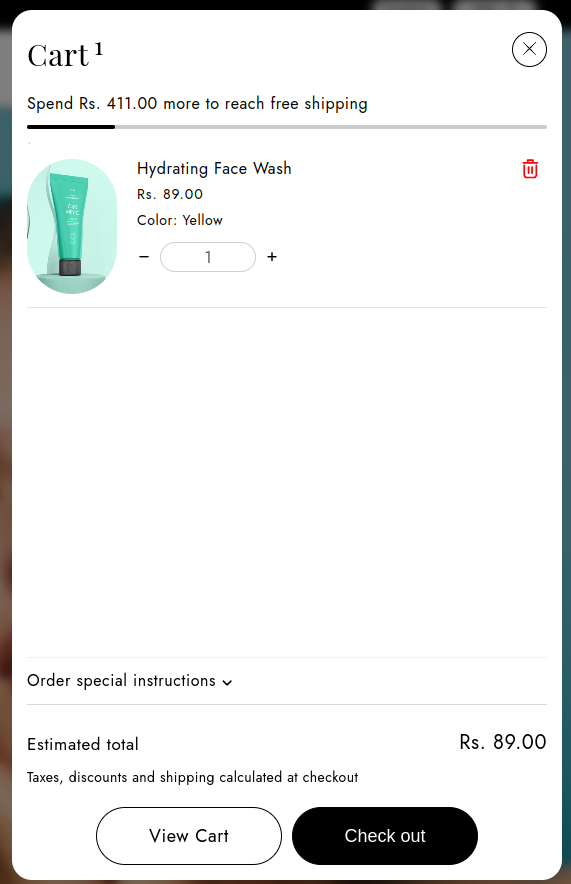
Steps to Enable and Configure the Free Shipping Bar in the Cart for the Adorn Theme
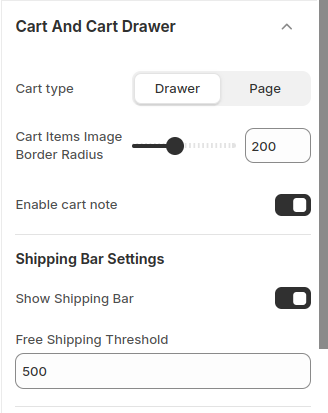
1. Access Theme Customizer
- Log in to your Shopify admin.
- Navigate to Online Store > Themes, then click Customize on the Adorn theme.
2. Locate Cart Drawer Settings
- In the theme Customizer, open the Cart Drawer section.
3. Enable the Shipping Bar
- Look for the Show Shipping Bar option and toggle it on to activate the feature.
4. Set Free Shipping Threshold
- Locate the Free Shipping Threshold field.
- Enter the desired value for the free shipping threshold (e.g., 500). This will be the cart value customers must reach to qualify for free shipping.