
Incart Upsell
In-Cart Upsell is a feature of the Adorn theme designed to boost sales by suggesting additional products directly in the cart drawer. This strategic placement encourages customers to add complementary or popular items to their order before completing the checkout process. By offering relevant product recommendations at the right moment, In-Cart Upsell enhances the shopping experience and helps increase your store's average order value.
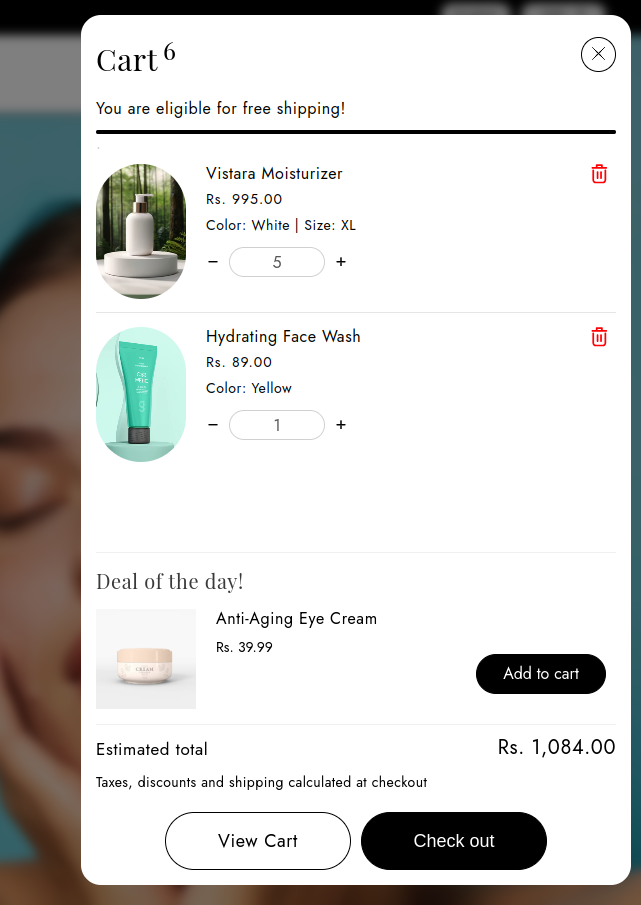
Steps to Enable and Configure the incart Upsell in the Cart Drawer for the Adorn Theme
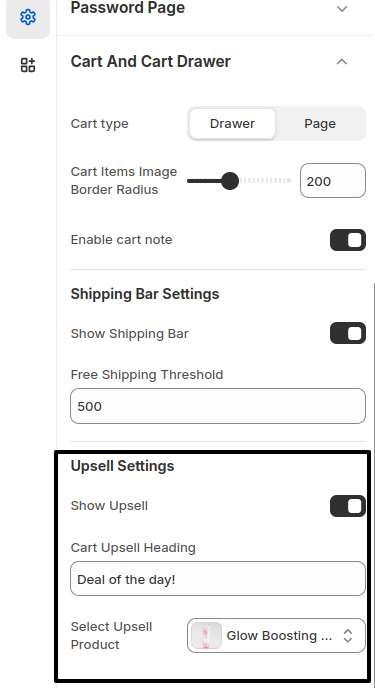
1. Access the Customizer
- Log in to your Shopify admin.
- Navigate to Online Store > Themes, then click Customize on the Adorn theme.
2. Locate Cart Drawer Settings
- In the theme Customizer, open the Cart Drawer section.
3. Enable Upsell
- Look for the Show Upsell option and toggle it on to activate the feature.
4. Set a Heading
- Find the Cart Upsell Heading field and enter a heading, such as "Deal of the Day!" or any other attention-grabbing title.
5. Select Upsell Product
- Use the Select Upsell Product option to choose the product you want to recommend in the cart drawer.