
Footer
The Footer in the Dynamic theme serves as a structured, reliable area at the bottom of every page for essential links and brand information. It supports navigation menus, social icons, and optional elements like newsletter signup and trust details, helping improve usability, reinforce brand credibility, and keep key information easily accessible for customers.
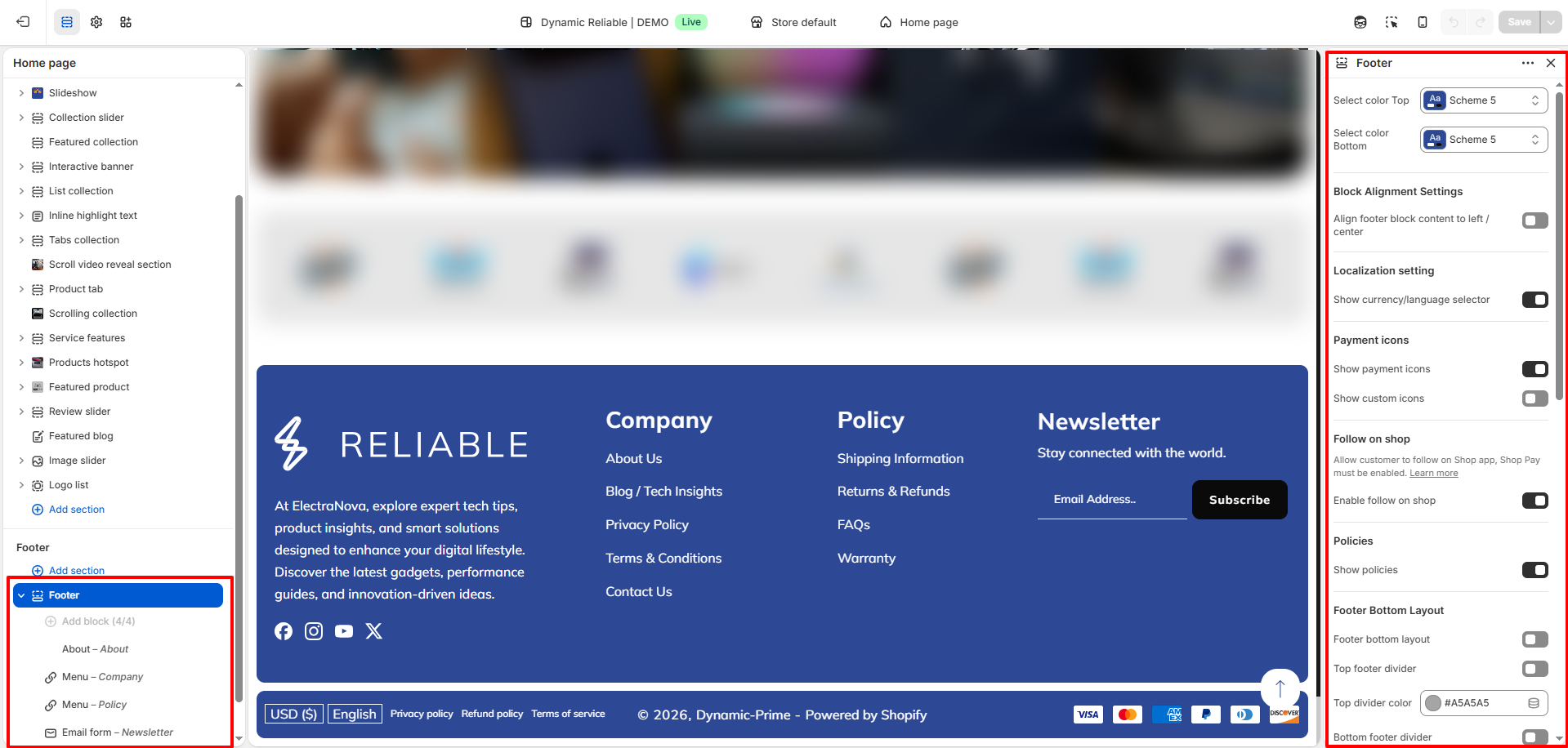
How to Configure the Footer
- From your Shopify admin, go to Online Store ? Themes.
- Click Customize on the Dynamic theme.
- In the Theme Editor, select the Footer section from the left sidebar.
- Adjust the settings, blocks, and layout options according to your preferences.
- Click Save to apply your changes.
How to Configure the Footer Settings
- Colors:
- Select color Top: Choose a predefined color scheme for the top region of the footer.
- Select color Bottom: Choose a predefined color scheme for the bottom region of the footer.
- Block Alignment Settings:
- Align footer block content to left / center: Toggle between left-aligned and center-aligned content for your footer blocks.
- Localization Settings: Allow users to select their preferred
currency and language. This requires
setup in your Shopify admin:
- Currency: Navigate to Settings > Markets and add the desired countries/regions.
- Language: Go to Settings > Languages and add the supported languages.
- Show Currency / Language Selector: Toggle this on to display the selectors in the footer.
- Payment Icons: Display supported payment method icons to build
trust. These icons are pulled
automatically from your Shopify Payment settings.
- Show Payment Icons: Toggle the visibility of icons for the payment methods you accept.
- Show Custom Icons: Add your own custom payment or trust icons if needed.
- Note: Configure your active payment methods in Settings > Payments.
- Follow on shop: Allows customers to follow your brand on the
Shop app directly from the
footer.
- Enable follow on shop: Toggle this on to show the "Follow" button.
- Note: Shop Pay must be enabled in your Shopify settings for this feature to work.
- Policies: Automatically display links to your store's legal
policies (Privacy Policy,
Refund Policy, etc.).
- Show Policies: Toggle to display links to policies added in Settings > Policies.
- Footer Bottom Layout: Customize the arrangement and visual
separation of the bottom bar area.
- Footer bottom layout: Toggle between different layout styles for the bottom area.
- Top/Bottom Dividers: Display divider lines at the top or bottom of the footer for better visual separation.
- Divider Color: Select custom colors for both the top and bottom dividers.
- Footer Logo: Choose a brand logo to represent your identity in
the footer area. This logo often appears above your brand description.
- Select image: Choose a brand logo to represent your identity in the footer area. This logo often appears above your brand description.
- Footer Bar & Announcement: Enable a text announcement area in
the footer bottom bar.
- Enable footer announcement: Display a brief message or promotion in the footer bottom bar.
- Footer bottom bar background: Set a unique background color for the bottom-most bar.
- Social & Icons: Toggle the visibility of icons for the social
media links configured in your Theme Settings.
- Show Social Icons: Toggle the visibility of icons for the social media links configured in your Theme Settings.
- Section Spacing: Fine-tune the layout dimensions of the footer
section:
- Padding top/bottom: Adjust internal vertical spacing.
- Section gap: Control the spacing between footer blocks.
- Margin left-right/top: Set external spacing for the footer container.
- Border radius: add rounded corners to the footer section.
Footer Block Settings
To configure an existing block, select the block from the side menu.
1. About
- Text: Add descriptive text or brand messaging to the footer block.
- Description: Briefly describe your brand, values, or purpose to build customer trust.
2. Menu
- Heading: Enter the main heading for the navigation list.
- Select Menu: Choose a Shopify navigation menu (e.g., Footer Menu) to display.
3. Newsletter
- Heading: Set a catchy heading to encourage signups (e.g., "Stay connected with the world.").
- Description: Brief text informing subscribers what they'll receive.
- Show Newsletter: Toggle the visibility of the email subscription form.
- Newsletter Border Color: Select the border color of the newsletter input field.
FAQs
Can I customize my payment icons?
Unfortunately, no. Payment icons are automatically pulled from the Payment settings in your Shopify admin and cannot be manually adjusted.
Why aren't my social media icons visible?
To display your social media icons, ensure they're configured under Theme Settings > Social Media. Once added, they'll appear in the Social Links block seamlessly.
How do I update the copyright message?
The copyright message can be edited through translations. Go to the Theme Editor, click the ... menu, and select Edit Default Theme Content to make your changes.