
Scroll Zoom Video
The Scroll Zoom Video section allows you to create an immersive visual experience by displaying a video that responds to user scrolling. This section is ideal for storytelling, brand promotion, and showcasing lifestyle visuals in a dynamic way.
As users scroll through the page, the video creates a subtle zoom and motion effect, making the content feel more interactive and engaging. You can overlay headings and text to highlight your message.
This section enhances user experience by combining motion visuals with meaningful content, helping capture attention and increase engagement.

How To Add the Scroll Zoom Video
- Login to your Shopify Theme Customizer.
- Navigate to the page where you want to add this section.
- Click on the Add section button.
- Select Scroll zoom video from the list.
How To Edit the Scroll Zoom Video
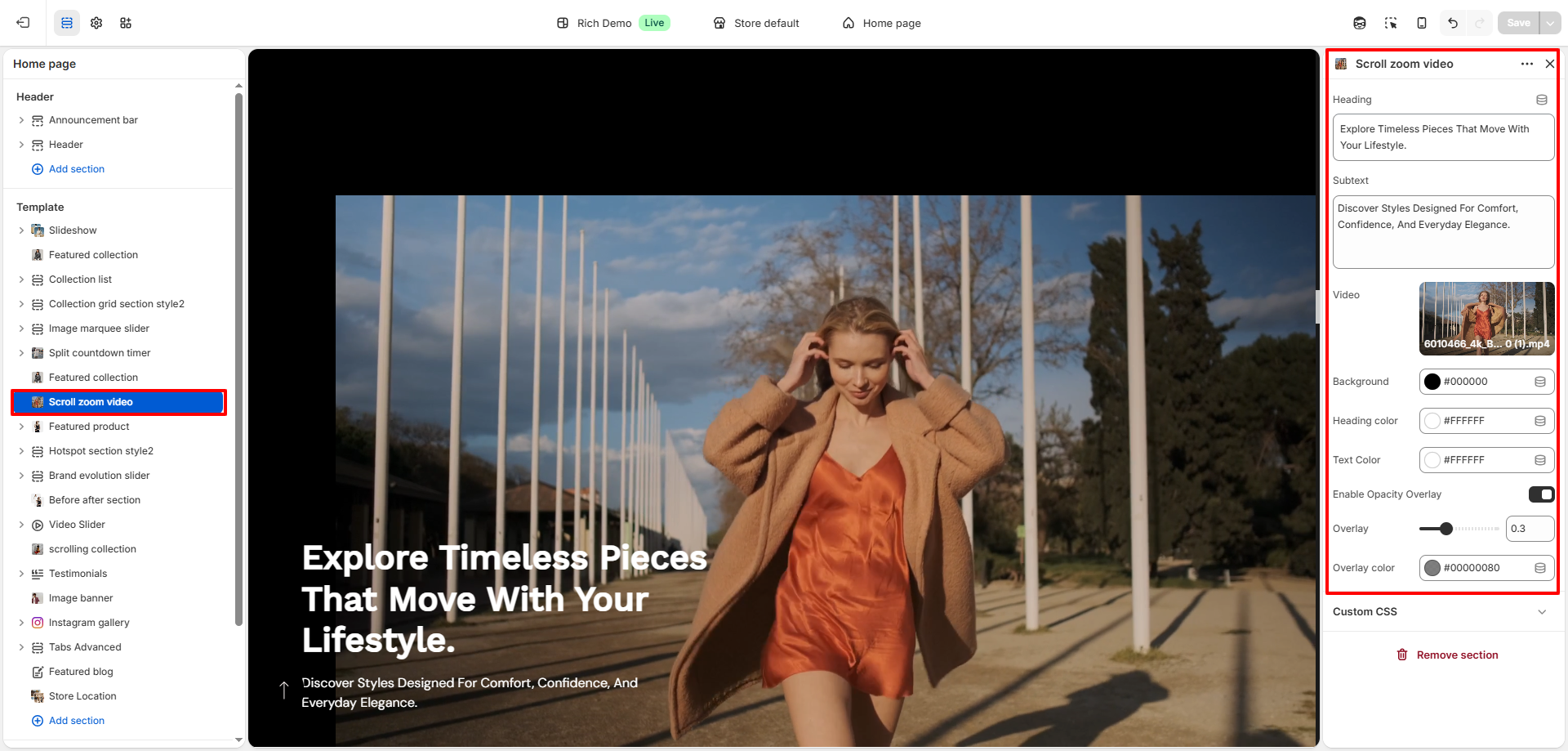
- Heading: Add a main heading to display over the video.
- Subtext: Add supporting text below the heading.
- Video: Upload or select a video to display in the section.
- Background Color: Set a background color for the section.
- Heading Color: Customize the color of the heading text.
- Text Color: Set the color of the subtext.
- Enable Opacity Overlay: Toggle to apply an overlay on the video.
- Overlay Opacity: Adjust how dark or light the overlay appears.
- Overlay Color: Choose the color of the overlay layer.
How It Works
- The video responds to user scrolling, creating a zoom-in or motion effect as the user moves down the page.
- The heading and subtext remain visible on top of the video, ensuring your message is always clear.
- An optional overlay improves text readability and adds a stylish visual layer.
Tips
- Use high-quality, slow-motion or cinematic videos for best results.
- Keep text short and impactful to maintain focus on visuals.
- Use overlay wisely to ensure text is readable on all devices.
- Optimize video size for faster loading performance.